Neat that they introduced a voucher option that'll be viable for most people, unfortunately my system having extra steps makes it a little tougher to implement 1-to-1 on Cobra. For traditional vouchers/squadron picks it's going to work very well just giving you the copies of whatever card(s) you need, but mine has the caveat of limitations to cashing in once per card and having to draft the actual copy of the card.
I'll probably just have to continue including the voucher options in the land box for a drafter to manually add to their Cobra decks online.
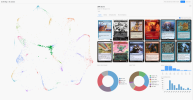
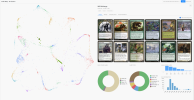
All that said, this is a pretty handy tool with some neat possibilities. I ran it for 300 in the background while working on stuff and it came out with some cool outputs:
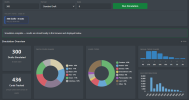
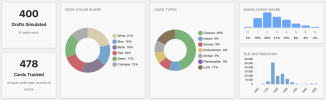
Expected color distributions here, nothing out of the ordinary with the base breakdown.
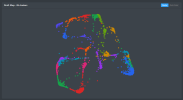
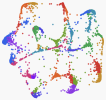
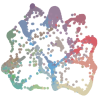
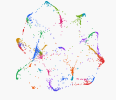
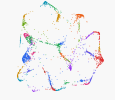
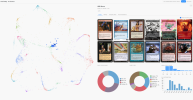
26 clusters in my 450 sounds about right, I'm liking the criss-crossing overlap showing the ability to bleed between archetypes. I'm assuming that running for more simulations will leader to more dense clusters like @Erik Twice got with 500. Maybe I'll just go with 1000 or something at the beginning of work next week and see what happens by the end of it.
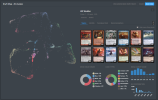
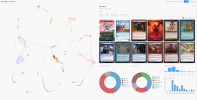
I like the visualization of these clusters with staples and other stats, really cool feature to nerd out over for hours at a time. The bots definitely have their limitations overall, but this looks way better than previous bot logic applied in single drafts. It identified just about every major archetype I've built over the years or covered in my cube primer.
Many of these are repeated, which, after looking into the decks, sometimes makes sense and sometimes doesn't. The two "W Weenie" clusters, for example, roughly refer to two distinct groups of cards, a tokens build and an artifact aggro build. Yet, the two "WG midrange" decks have essentially the same staple cards...
Some of the themes that bridge certain colors are not represented, even though they are not an issue to draft in the cube, such as the White-Black Constellation/Saga Control deck. I think the nuances of this deck and these colors might too fine-grained for the CubeCobra bots, with options ranging/blending between Liliana's Contract/Changeling combo, Demonic Pact Blink, low-power-matters reanimator (Shirei, Shizo's Caretaker, Vesperlark, Triskelion) and so on.
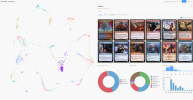
Green and Red turned to be the least drafted combination, and the strange assortment of cards chosen by the bots reflect the variety of decks which might be drafted in these colors but which are, nevertheless, not always overlapping: tappers/untappers, land storm, madness, power-matters, etc.
Something I didn't expect, Dimension X Pizzasaur was the second highest picked card, being taken P1P1 98% of the time.
I played around a bit with my old cube and my WIP cube. Tried 100, 300 and 1000 drafts. At 1000 there are ton of extraneous data, like 4 same WR weenie archetypes. Also, bots obviously can't figure more niche archetypes. They figured out enchantments as WG midrange, but completely ignored BG and BW enchantments.
While I get that you can take lessons from how things connect on the map, I struggle to imagine how exactly to analyze the data to learn something actually useful. I'd be interested if someone more knowledgeable can point out what's valuable except obvious toy factor.
It's a cute tool, but it relies on a relative degree of normalcy. It can draft a storm deck in my cube and it looks quite competent, because it knows that Lion's Eye Diamond and Yawgmoth's Will often appear together in the same decks. On the other hand, it doesn't have the knowledge base to think about drafting Stoneforge Mystic and Trinket Mage to fetch Giantcraft Helm that buffs Disruptor of Currents and Ethereal Forager. To the contrary, the "exemplary" WB weenie deck plays a Stoneforge with no targets; the tool is more keen to pair the card with Ranger-Captain of Eos than Pre-War Formalwear(although they are both strongly associated). Ultimately, the bots are really good at building uninspired and boring decks that miss the point of the cube, so I struggle to see what utility I would get out of it. If I had a ton of drafts of my cube and ran it on only that data then you could maybe draw some fun conclusions.
It also picks the three SOS cards I just added 100% of the time with seemingly no context, so you get fun things like white weenies splashing Tragedy Feaster off 0 black sources.
I did try with 2500 draftrs, but it doesn't lead to better data since it runs into limitations with duplication and clustering. The data is pretty much identical to 500, it's just repeated more times. It's also hard to adjust it to a reasonable level.
If sorting by colour, rather than just clusters, I think one can easily see the problem with green in my cube. Green is to the left, very heavily clustered around the lands archetype. It has UG ramp below and BG midrange on top, but little WG and, most importantly, no GR.
This makes sense since WG, UG and GR are historically weak guilds with little support and lack of powerful interaction or archetypes.
While I get that you can take lessons from how things connect on the map, I struggle to imagine how exactly to analyze the data to learn something actually useful.
Whether it's correct or not, I am treating the data as a way to show the more obvious archetypes that a cube contains. Another leap of dubious logic and now I'm equating that to what a newer player would find signals for.
I'll be posting more in my blog, but for example my lands/ramp cluster doesn't really communicate with the storm one, even though they should go well together. So as a more obvious signal, I am thinking of adding Sail into the West, a card I've considered before, but not as an explicit signpost to go into Simic combo.
As someone who interpreted somewhat more UMAP/clustered spatialized data plots than the average bear (though never made them), here are my twocents on what these are good for.
--Identifying new clusters you may have missed (i.e. all intended decks are considered "draftable" from historic human draft data).
--Make sure that all the clusters you think are there are there and that they have roughly the right number of members per cluster (i.e. color combination balance).
Then, once you've moved on from there, ask card-by-card questions.
--Ensure that cards are where you think they will be. (Want Goblin Bombardment to support Aristocrats? Make sure it's not in your Izzet Spellslinger pile)
--Identify cards that may be specific or nonspecific to archetypes. (Bone Shards getting in your UB Control? Yikes. Do you have LOTS of nonspecific cards? Maybe there's too much good stuff.)
In a nutshell, these are sniff tests--are the cards where you expect them to be? These are necessarily data reductions, though, so you're losing a lot of nuance (as we've already figured out in this thread).
I don't know how much you can actually count on the bots knowing what they are doing. After a draft I checked what the bots have been drafting and they've named a slightly weird black grindy sacrifice deck: Black Tempo. Maybe they don't really know what they are doing actually.
The bots absolutely, 100% do not know what they're doing, in the sense that I would completely disregard the name, but I think this is still valuable. It strongly suggests that these cards have a track record of working together (or at least that humans draft these cards together), though it doesn't know how these cards work together or why. Has anyone drafted a deck like this? If not, might be interesting to force it a few times!
From reading the documentation, it sounds like Gwen & co. manually set out a pool of cards for each cluster label. If you see something that doesn't make sense, it's likely because you've done something way off the beaten path and the computer grabbed the nearest label out of desperation. In which case, congrats! I want to see those decks.
I feel very stupid, but... I tried using it, many times, on many cubes, and it always gives me 800 different clusters, each one with exactly one deck. I am not sure about what I am doing wrong...
I feel very stupid, but... I tried using it, many times, on many cubes, and it always gives me 800 different clusters, each one with exactly one deck. I am not sure about what I am doing wrong...
This sounds like a fascinating problem! Would you mind sharing a screenshot of your settings? Idk if any of us will be able to diagnose the issue, but it sure sounds interesting.
Okay, so, I tried for the Cube they used at the 2007 Invitational: https://cubecobra.com/cube/list/invi07-og?view=Mainboard (so that I am sure the problem is not that my Cubes are so badly done that even cubecobra refuses to touch them)
I haven't change anything in the settings, everything very normal
All 800 drafted decks belong to a cluster that consists of just them, and all these clusters are overlapping in the map. Also, the name of each cluster is (colour of the deck) + Big Ramp -- and this is true in any Cube I try:
One more thought on what this cluster map *could* be good for:
This feature isn't included because it would be computationally expensive, but where cluster analysis of UMAP is really really good for is comparisons of a map under similar but distinct conditions. For example, if I added in the aforementioned Goblin Bombardment, what does it do to my clusters? What does it enable, and what does it make less likely to coalesce? Which clusters are more prevalent, and which decrease?
To make this really explicit, if you're thinking of some additions or cuts, implement them, rerun the simulation, then compare the maps they draw.
More later because I'm super tired this week, but I wanted to get this in there in case someone else has the bandwidth to do so. If not I'll probably illustrate this tomorrow.
Notice how they look really different! This is to illustrate LESSON ONE: THAT THE SHAPE OF THE CLUSTERS DOES NOT REPRESENT ANY FUNDAMENTAL TRUTH ABOUT YOUR DATA, ONLY A PERSPECTIVE. They are simply a maximization of a set of parameters which smush the complexity of your data down into something we can easily comprehend. Much like how a spring appears to be a circle when viewed from above, this perspective may or may not be representative of data that's actually relevant to you.
Okay, let's focus in on the middle of the second image. See how there's a big Y-shaped bit? That's UBR storm!
Next to it, we see another, more discard-focused UBR storm cluster!
And next to THAT, another UR storm cluster! Gee, looks like storm is in the middle!
Okay, and if we follow UR storm out, we see UR burn--this makes a lot of sense!
Huh, what's that olive group splashed across storm? Maybe UB storm??
What are you doing here, WG midrange????
This is because of LESSON TWO: ADJACENT CLUSTERS ARE OFTEN, BUT NOT ALWAYS, RELATED TO ONE ANOTHER. So be really careful about drawing conclusions from saying that one cluster "bleeds into" on another! This is a very common mistake, and one which people have written a ton of specialized software to resolve, oftentimes by using what is called pseudotime analysis, at least in biology. However, this requires lots and lots of data to do properly, which we won't have.
=======================================
So, that's a lot about what we can't do, but what CAN we deduce from this sort of analysis? Let's go back to the basics I mentioned in my previous post: when I add a minimal storm package, which clusters appear, which disappear, which grow, and which shrink? N.B. that I manually added clusters with similar tags and colors, which is highly subjective but necessary for this type of analysis--see spoiler tag below the table for the unclustered data.
I did some preliminary analysis of this. Here are my findings:
Baseline (% of decks)
With Storm (% of decks)
Change (% of decks)
2
DISAPPEARED
BR Midrange -- Humans Soldiers Enchantments
1.3
DISAPPEARED
BRG Lands Midrange --
1.6
DISAPPEARED
UGR Lands Midrange -- Wizards Enchantments
3.6
DISAPPEARED
UR Spellslinger -- Wizards Spells
1.7
DISAPPEARED
WUB Control -- Spells
8.2
3.3
-4.9
WR Artifact Aggro -- Artifacts Soldiers
5.4
1.6
-3.8
UG Lands Midrange -- Enchantments
8.2
6.8
-1.4
R Aggro -- Goblins Artifacts
10.3
9.6
-0.7
G Lands Soup -- Enchantments
9.2
8.5
-0.7
UB Tempo -- Ninjas Spells
1.3
0.9
-0.4
UBG Value Midrange --
2.4
2.1
-0.3
B Aristocrats -- Zombies Humans
1.4
1.1
-0.3
WU Artifact Control -- Artifacts
6.3
6.1
-0.2
W Weenie -- Soldiers Spirits Enchantments
5.7
5.5
-0.2
BR Aristocrats -- Vampires Humans
2.1
1.9
-0.2
G Midrange -- Enchantments
2.2
2
-0.2
WUG Value -- Wizards Enchantments
3.9
3.8
-0.1
B Tempo -- Zombies
5.4
5.4
0
BG Midrange --
1.1
1.2
0.1
U Artifacts -- Wizards Spells
2.7
3.2
0.5
WU Control -- Wizards Spells
3.4
4.1
0.7
WU Blink -- Spirits Wizards
3.8
4.5
0.7
WB Weenie -- Zombies Knights
1.6
2.4
0.8
WG Midrange -- Soldiers Humans
0.9
1.7
0.8
BR Aristocrats -- Artifacts
6
7.1
1.1
WR Aggro -- Knights Soldiers
2.5
4.1
1.6
UR Burn -- Wizards Artifacts
1
NEW
BG Lands Midrange --
5.2
NEW
UBR Storm -- Spells
5.4
NEW
UG Ramp -- Enchantments
1.6
NEW
UR Storm -- Spells
Raw
Sorted
Aligned
Un-clumped
Clumped
Clumps sorted by biggest winners and losers
Total %
Total %
100.1
99.2
Baseline
With Storm
Baseline
With Storm
Baseline
With Storm
Baseline
With Storm
Change
Baseline
With Storm
Change
Baseline (% of decks)
With Storm (% of decks)
Change (% of decks)
Number
Colors
Name
Percent
Tags
Number
Colors
Name
Percent
Tags
Number
Colors
Name
Percent
Tags
Number
Colors
Name
Percent
Tags
Number
Colors
Name
Percent
Tags
Number
Colors
Name
Percent
Tags
1
G
Lands Soup
6.2
Enchantments
1
G
Lands Soup
9.6
Enchantments
18
B
Aristocrats
2.4
Zombies
Humans
23
B
Aristocrats
2.1
Zombies
Humans
18
B
Aristocrats
2.4
Zombies
Humans
23
B
Aristocrats
2.1
Zombies
Humans
2.4
2.1
-0.3
B Aristocrats -- Zombies Humans
2.4
2.1
-0.3
B Aristocrats -- Zombies Humans
2
DISAPPEARED
BR Midrange -- Humans Soldiers Enchantments
2
WR
Aggro
6
Knights
Soldiers
2
WR
Aggo
7.1
Knights
Soldiers
Artifacts
6
B
Tempo
3.9
Zombies
Humans
6
B
Tempo
3.8
Zombies
1.3
DISAPPEARED
BRG Lands Midrange --
3
UG
Ramp
5.4
Enchantments
3
UB
Tempo
4.8
Ninjas
Wizards
11
BG
Midrange
3.2
Zombies
35
BG
Lands Midrange
1
6
B
Tempo
3.9
Zombies
Humans
6
B
Tempo
3.8
Zombies
3.9
3.8
-0.1
B Tempo -- Zombies
3.9
3.8
-0.1
B Tempo -- Zombies
1.6
DISAPPEARED
UGR Lands Midrange -- Wizards Enchantments
4
UB
Tempo
4.8
Ninjas
Spells
4
WB
Weenie
4.5
Zombies
Knights
23
BG
Midrange
2.2
8
BG
Midrange
3.4
3.6
DISAPPEARED
UR Spellslinger -- Wizards Spells
5
R
Aggro
3.9
Goblins
Artifacts
Humans
5
UR
Burn
4.1
Wizards
8
BR
Aristocrats
3.7
Vampires
Warriors
24
BG
Midrange
2
Zombies
11
BG
Midrange
3.2
Zombies
8
BG
Midrange
3.4
3.2
3.4
0.2
BG Midrange --
5.4
5.4
0
BG Midrange --
1.7
DISAPPEARED
WUB Control -- Spells
6
B
Tempo
3.9
Zombies
Humans
6
B
Tempo
3.8
Zombies
26
BR
Aristocrats
2
Warriors
Vampires
9
BR
Aristocrats
3.3
Vampires
Humans
23
BG
Midrange
2.2
24
BG
Midrange
2
Zombies
2.2
2
-0.2
BG Midrange -- Zombies
8.2
3.3
-4.9
WR Artifact Aggro -- Artifacts Soldiers
7
WB
Weenie
3.8
Zombies
Knights
7
UB
Tempo
3.7
Ninjas
Spells
38
BR
Aristocrats
0.9
Artifacts
19
BR
Aristocrats
2.2
Vampires
Zombies
5.4
1.6
-3.8
UG Lands Midrange -- Enchantments
8
BR
Aristocrats
3.7
Vampires
Warriors
8
BG
Midrange
3.4
25
BR
Midrange
2
Humans
Soldiers
Enchantments
28
BR
Aristocrats
1.7
Artifacts
35
BG
Lands Midrange
1
1
NEW
BG Lands Midrange --
1
NEW
BG Lands Midrange --
8.2
6.8
-1.4
R Aggro -- Goblins Artifacts
9
UR
Spellslinger
3.6
Wizards
Spells
9
BR
Aristocrats
3.3
Vampires
Humans
33
BRG
Lands Midrange
1.3
1
G
Lands Soup
9.6
Enchantments
10.3
9.6
-0.7
G Lands Soup -- Enchantments
10
WU
Blink
3.4
Spirits
Wizards
10
WR
Artifact Aggro
3.3
Artifacts
Soldiers
1
G
Lands Soup
6.2
Enchantments
27
G
Midrange
1.9
Enchantments
8
BR
Aristocrats
3.7
Vampires
Warriors
9
BR
Aristocrats
3.3
Vampires
Humans
3.7
3.3
-0.4
BR Aristocrats -- Vampires Humans
5.7
5.5
-0.2
BR Aristocrats -- Vampires Humans
9.2
8.5
-0.7
UB Tempo -- Ninjas Spells
11
BG
Midrange
3.2
Zombies
11
WU
Contro
3.2
Wizards
Spells
17
G
Lands Soup
2.5
Enchantments
12
R
Aggro
3.2
Goblins
Artifacts
26
BR
Aristocrats
2
Warriors
Vampires
19
BR
Aristocrats
2.2
Vampires
Zombies
2
2.2
0.2
BR Aristocrats -- Vampires Zombies
1.3
0.9
-0.4
UBG Value Midrange --
12
W
Weenie
3.2
Spirits
Soldiers
12
R
Aggro
3.2
Goblins
Artifacts
28
G
Lands Soup
1.6
Warriors
Enchantments
15
R
Aggro
2.5
Goblins
38
BR
Aristocrats
0.9
Artifacts
28
BR
Aristocrats
1.7
Artifacts
0.9
1.7
0.8
BR Aristocrats -- Artifacts
0.9
1.7
0.8
BR Aristocrats -- Artifacts
2.4
2.1
-0.3
B Aristocrats -- Zombies Humans
13
R
Aggro
3.1
Goblins
13
UBR
Storm
3.1
Spells
24
G
Midrange
2.1
Enchantments
34
R
Aggro
1.1
Goblins
Humans
1.4
1.1
-0.3
WU Artifact Control -- Artifacts
14
WR
Artifact Aggro
2.8
Artifacts
14
UG
Ramp
2.9
Enchantments
5
R
Aggro
3.9
Goblins
Artifacts
Humans
32
U
Artifacts
1.2
Wizards
Spells
25
BR
Midrange
2
Humans
Soldiers
Enchantments
2
DISAPPEARED
BR Midrange -- Humans Soldiers Enchantments
2
DISAPPEARED
BR Midrange -- Humans Soldiers Enchantments
6.3
6.1
-0.2
W Weenie -- Soldiers Spirits Enchantments
15
WU
Control
2.7
Wizards
Spells
15
R
Aggro
2.5
Goblins
13
R
Aggro
3.1
Goblins
3
UB
Tempo
4.8
Ninjas
Wizards
5.7
5.5
-0.2
BR Aristocrats -- Vampires Humans
16
UR
Burn
2.5
Wizards
Spells
16
UG
Ramp
2.5
Enchantments
35
R
Welder
1.2
Artifacts
7
UB
Tempo
3.7
Ninjas
Spells
33
BRG
Lands Midrange
1.3
1.3
DISAPPEARED
BRG Lands Midrange --
1.3
DISAPPEARED
BRG Lands Midrange --
2.1
1.9
-0.2
G Midrange -- Enchantments
17
G
Lands Soup
2.5
Enchantments
17
W
Weenie
2.4
Soldiers
Spirits
36
U
Artifacts
1.1
Wizards
Spells
36
UBG
Value Midrange
0.9
2.2
2
-0.2
WUG Value -- Wizards Enchantments
18
B
Aristocrats
2.4
Zombies
Humans
18
WG
Midrange
2.4
Soldiers
Humans
Enchantments
4
UB
Tempo
4.8
Ninjas
Spells
13
UBR
Storm
3.1
Spells
1
G
Lands Soup
6.2
Enchantments
1
G
Lands Soup
9.6
Enchantments
6.2
9.6
3.4
G Lands Soup -- Enchantments
10.3
9.6
-0.7
G Lands Soup -- Enchantments
3.9
3.8
-0.1
B Tempo -- Zombies
19
WUG
Value
2.2
Wizards
Spells
Enchantments
19
BR
Aristocrats
2.2
Vampires
Zombies
20
UB
Tempo
2.2
Ninjas
21
UBR
Storm
2.1
Spells
17
G
Lands Soup
2.5
Enchantments
2.5
DISAPPEARED
G Lands Soup -- Enchantments
5.4
5.4
0
BG Midrange --
20
UB
Tempo
2.2
Ninjas
20
W
Weenie
2.2
Soldiers
Knights
22
UB
Tempo
2.2
Ninjas
Wizards
30
UG
Lands Midrange
1.6
Enchantments
28
G
Lands Soup
1.6
Warriors
Enchantments
1.6
DISAPPEARED
G Lands Soup -- Warriors Enchantments
1.1
1.2
0.1
U Artifacts -- Wizards Spells
21
W
Weenie
2.2
Soldiers
Knights
21
UBR
Storm
2.1
Spells
32
UBG
Value Midrange
1.3
14
UG
Ramp
2.9
Enchantments
2.7
3.2
0.5
WU Control -- Wizards Spells
22
UB
Tempo
2.2
Ninjas
Wizards
22
WU
Blink
2.1
Spirits
Wizards
3
UG
Ramp
5.4
Enchantments
16
UG
Ramp
2.5
Enchantments
24
G
Midrange
2.1
Enchantments
27
G
Midrange
1.9
Enchantments
2.1
1.9
-0.2
G Midrange -- Enchantments
2.1
1.9
-0.2
G Midrange -- Enchantments
3.4
4.1
0.7
WU Blink -- Spirits Wizards
23
BG
Midrange
2.2
23
B
Aristocrats
2.1
Zombies
Humans
29
UGR
Lands Midrange
1.6
Wizards
Enchantments
5
UR
Burn
4.1
Wizards
3.8
4.5
0.7
WB Weenie -- Zombies Knights
24
G
Midrange
2.1
Enchantments
24
BG
Midrange
2
Zombies
16
UR
Burn
2.5
Wizards
Spells
29
UR
Storm
1.6
Spells
5
R
Aggro
3.9
Goblins
Artifacts
Humans
12
R
Aggro
3.2
Goblins
Artifacts
3.9
3.2
-0.7
R Aggro -- Goblins Artifacts
8.2
6.8
-1.4
R Aggro -- Goblins Artifacts
1.6
2.4
0.8
WG Midrange -- Soldiers Humans
25
BR
Midrange
2
Humans
Soldiers
Enchantments
25
WUG
Value
2
Wizards
Enchantments
9
UR
Spellslinger
3.6
Wizards
Spells
17
W
Weenie
2.4
Soldiers
Spirits
35
R
Welder
1.2
Artifacts
34
R
Aggro
1.1
Goblins
Humans
1.2
1.1
-0.1
R Aggro -- Goblins Humans
0.9
1.7
0.8
BR Aristocrats -- Artifacts
26
BR
Aristocrats
2
Warriors
Vampires
26
WU
Blink
2
Spirits
Wizards
12
W
Weenie
3.2
Spirits
Soldiers
20
W
Weenie
2.2
Soldiers
Knights
13
R
Aggro
3.1
Goblins
15
R
Aggro
2.5
Goblins
3.1
2.5
-0.6
R Aggro -- Goblins
6
7.1
1.1
WR Aggo -- Knights Soldiers
27
WUB
Control
1.7
Spells
27
G
Midrange
1.9
Enchantments
21
W
Weenie
2.2
Soldiers
Knights
31
W
Weenie
1.5
Spirits
Soldiers
Artifacts
2.5
4.1
1.6
UR Burn -- Wizards Artifacts
28
G
Lands Soup
1.6
Warriors
Enchantments
28
BR
Aristocrats
1.7
Artifacts
37
W
Weenie
0.9
Soldiers
Humans
Artifacts
4
WB
Weenie
4.5
Zombies
Knights
36
U
Artifacts
1.1
Wizards
Spells
32
U
Artifacts
1.2
Wizards
Spells
1.1
1.2
0.1
U Artifacts -- Wizards Spells
1.1
1.2
0.1
U Artifacts -- Wizards Spells
1
NEW
BG Lands Midrange --
29
UGR
Lands Midrange
1.6
Wizards
Enchantments
29
UR
Storm
1.6
Spells
7
WB
Weenie
3.8
Zombies
Knights
18
WG
Midrange
2.4
Soldiers
Humans
Enchantments
5.2
NEW
UBR Storm -- Spells
30
WG
Midrange
1.6
Warriors
Knights
Enchantments
30
UG
Lands Midrange
1.6
Enchantments
30
WG
Midrange
1.6
Warriors
Knights
Enchantments
2
WR
Aggo
7.1
Knights
Soldiers
Artifacts
4
UB
Tempo
4.8
Ninjas
Spells
7
UB
Tempo
3.7
Ninjas
Spells
4.8
3.7
-1.1
UB Tempo -- Ninjas Spells
9.2
8.5
-0.7
UB Tempo -- Ninjas Spells
5.4
NEW
UG Ramp -- Enchantments
31
WU
Artifact Control
1.4
Artifacts
31
W
Weenie
1.5
Spirits
Soldiers
Artifacts
2
WR
Aggro
6
Knights
Soldiers
10
WR
Artifact Aggro
3.3
Artifacts
Soldiers
22
UB
Tempo
2.2
Ninjas
Wizards
3
UB
Tempo
4.8
Ninjas
Wizards
2.2
4.8
2.6
UB Tempo -- Ninjas Wizards
1.6
NEW
UR Storm -- Spells
32
UBG
Value Midrange
1.3
32
U
Artifacts
1.2
Wizards
Spells
14
WR
Artifact Aggro
2.8
Artifacts
33
WU
Artifact Control
1.1
Artifacts
20
UB
Tempo
2.2
Ninjas
2.2
DISAPPEARED
UB Tempo -- Ninjas
33
BRG
Lands Midrange
1.3
33
WU
Artifact Control
1.1
Artifacts
34
WR
Artifact Aggro
1.3
Soldiers
Artifacts
Humans
22
WU
Blink
2.1
Spirits
Wizards
34
WR
Artifact Aggro
1.3
Soldiers
Artifacts
Humans
34
R
Aggro
1.1
Goblins
Humans
31
WU
Artifact Control
1.4
Artifacts
26
WU
Blink
2
Spirits
Wizards
32
UBG
Value Midrange
1.3
36
UBG
Value Midrange
0.9
1.3
0.9
-0.4
UBG Value Midrange --
1.3
0.9
-0.4
UBG Value Midrange --
35
R
Welder
1.2
Artifacts
35
BG
Lands Midrange
1
10
WU
Blink
3.4
Spirits
Wizards
11
WU
Contro
3.2
Wizards
Spells
36
U
Artifacts
1.1
Wizards
Spells
36
UBG
Value Midrange
0.9
15
WU
Control
2.7
Wizards
Spells
25
WUG
Value
2
Wizards
Enchantments
13
UBR
Storm
3.1
Spells
3.1
NEW
UBR Storm -- Spells
5.2
NEW
UBR Storm -- Spells
37
W
Weenie
0.9
Soldiers
Humans
Artifacts
27
WUB
Control
1.7
Spells
21
UBR
Storm
2.1
Spells
2.1
NEW
UBR Storm -- Spells
38
BR
Aristocrats
0.9
Artifacts
19
WUG
Value
2.2
Wizards
Spells
Enchantments
3
UG
Ramp
5.4
Enchantments
30
UG
Lands Midrange
1.6
Enchantments
5.4
1.6
-3.8
UG Lands Midrange -- Enchantments
5.4
1.6
-3.8
UG Lands Midrange -- Enchantments
14
UG
Ramp
2.9
Enchantments
2.9
NEW
UG Ramp -- Enchantments
5.4
NEW
UG Ramp -- Enchantments
16
UG
Ramp
2.5
Enchantments
2.5
NEW
UG Ramp -- Enchantments
29
UGR
Lands Midrange
1.6
Wizards
Enchantments
1.6
DISAPPEARED
UGR Lands Midrange -- Wizards Enchantments
1.6
DISAPPEARED
UGR Lands Midrange -- Wizards Enchantments
16
UR
Burn
2.5
Wizards
Spells
5
UR
Burn
4.1
Wizards
Artifacts
2.5
4.1
1.6
UR Burn -- Wizards Artifacts
2.5
4.1
1.6
UR Burn -- Wizards Artifacts
9
UR
Spellslinger
3.6
Wizards
Spells
3.6
DISAPPEARED
UR Spellslinger -- Wizards Spells
3.6
DISAPPEARED
UR Spellslinger -- Wizards Spells
29
UR
Storm
1.6
Spells
1.6
NEW
UR Storm -- Spells
1.6
NEW
UR Storm -- Spells
12
W
Weenie
3.2
Spirits
Soldiers
17
W
Weenie
2.4
Soldiers
Spirits
Enchantments
3.2
2.4
-0.8
W Weenie -- Soldiers Spirits Enchantments
6.3
6.1
-0.2
W Weenie -- Soldiers Spirits Enchantments
21
W
Weenie
2.2
Soldiers
Knights
20
W
Weenie
2.2
Soldiers
Knights
Artifacts
2.2
2.2
0
W Weenie -- Soldiers Knights Artifacts
37
W
Weenie
0.9
Soldiers
Humans
Artifacts
31
W
Weenie
1.5
Spirits
Soldiers
0.9
1.5
0.6
W Weenie -- Spirits Soldiers
7
WB
Weenie
3.8
Zombies
Knights
4
WB
Weenie
4.5
Zombies
Knights
3.8
4.5
0.7
WB Weenie -- Zombies Knights
3.8
4.5
0.7
WB Weenie -- Zombies Knights
30
WG
Midrange
1.6
Warriors
Knights
Enchantments
18
WG
Midrange
2.4
Soldiers
Humans
1.6
2.4
0.8
WG Midrange -- Soldiers Humans
1.6
2.4
0.8
WG Midrange -- Soldiers Humans
2
WR
Aggro
6
Knights
Soldiers
2
WR
Aggo
7.1
Knights
Soldiers
6
7.1
1.1
WR Aggo -- Knights Soldiers
6
7.1
1.1
WR Aggo -- Knights Soldiers
14
WR
Artifact Aggro
4.1
Artifacts
10
WR
Artifact Aggro
3.3
Artifacts
Soldiers
4.1
3.3
-0.8
WR Artifact Aggro -- Artifacts Soldiers
8.2
3.3
-4.9
WR Artifact Aggro -- Artifacts Soldiers
34
WR
Artifact Aggro
4.1
Soldiers
Artifacts
Humans
4.1
DISAPPEARED
WR Artifact Aggro -- Soldiers Artifacts Humans
31
WU
Artifact Control
1.4
Artifacts
33
WU
Artifact Control
1.1
Artifacts
1.4
1.1
-0.3
WU Artifact Control -- Artifacts
1.4
1.1
-0.3
WU Artifact Control -- Artifacts
10
WU
Blink
3.4
Spirits
Wizards
22
WU
Blink
2.1
Spirits
Wizards
3.4
2.1
-1.3
WU Blink -- Spirits Wizards
3.4
4.1
0.7
WU Blink -- Spirits Wizards
26
WU
Blink
2
Spirits
Wizards
2
NEW
WU Blink -- Spirits Wizards
15
WU
Control
2.7
Wizards
Spells
11
WU
Control
3.2
Wizards
Spells
2.7
3.2
0.5
WU Control -- Wizards Spells
2.7
3.2
0.5
WU Control -- Wizards Spells
27
WUB
Control
1.7
Spells
1.7
DISAPPEARED
WUB Control -- Spells
1.7
DISAPPEARED
WUB Control -- Spells
19
WUG
Value
2.2
Wizards
Spells
Enchantments
25
WUG
Value
2
Wizards
Enchantments
2.2
2
-0.2
WUG Value -- Wizards Enchantments
2.2
2
-0.2
WUG Value -- Wizards Enchantments
Here, we see that UBR and UR Storm have eaten the lunch of UGR Lands Midrange and UR Spellslinger--perhaps not too surprising! However, what this reveals are the knock-on/second-order effects of these changes. Weirdly enough, WR Artifact Aggro tanks the biggest hit from this*, which is surprising. However, given that R Aggro also suffers the third-most, I hypothesize that UBR/UR Storm relies on the burn spells that WR and R aggro needs to succeed. This is boosted by the fact that UR Burn shows up more as well.
As a secondary hypothesis, I suggest that the boost in WG Midrange, WB Weenie, and WU Blink are due to the now-uncontested W cards from the defunct WR deck, which suggests to me that the bots "perceive" these W cards as strong enough to get snapped up by multiple colors when not paired with WR.
Is this a problem? As we always say here, it depends on your goals! However, what this suggests to me is that R burn spells might be a lynchpin in multiple decks, so I might want to draft them first if I want to maximize my (predicted) deck power. On the design side, it might say that I have too many of these spells, and/or that I might want to pull back on W aggro cards.
*the overlap between WR Artifact Aggro and WR Aggro is likely strong; however, even if you add them together, the WR aggro decks are still tied for the greatest loss in deck share, which bolsters these findings. Similarly, UG Ramp/BRG Lands/UGR Lands might be getting retitled as UG Ramp -- Enchantments, in which case they would actually lose about 1.3 % of deck share. However, I've left these clusters discrete so as to not over-interpret.
=======================================
NOTES:
These second-order changes are purely from the availability of cards during the draft, which can be as perceived metagame forces, not due to metagame forces themselves.
There are some great single-card breakdowns in the Overperformers/Underperformers and Card Stats tabs right under the maps--check them out!
Also, this is by no means statistical. That's beyond both me and the data at this point.
Please let me know if you want my Excel sheet! It's not super, but I'm always happy to chat data.
I'm looking at a career change and learning web dev stuff right now. This project was to make a website that looking similar in style to a provided screenshot. The business-looking website provided seemed a little too boring, so I made this:
There's more if I were to scroll down on the page, but my monitor is pretty small and the top two sections are the fun ones.
One thing I realized while building this is how much modern web projects rely on feedback loops and user signals to guide iteration. Even simple portfolio builds benefit from structured input instead of just guessing what “looks good.” In production environments, teams often integrate delighted to collect user feedback continuously and turn subjective impressions into something measurable.
If anyone here is a web dev, let me know if you'd be available to help with some hopefully MTG-related projects in the future! I have an idea for my portfolio that I think is sweet, but will be considerably more work than this.
Nice, that’s a solid step as a first portfolio-style project.
Honestly, one of the biggest improvements you can make at this stage isn’t even more visuals — it’s thinking in terms of structure and reusability. If you can break those sections into clean components (header/hero/content blocks/cards), you’re already aligning with how real-world front-end work is typically organized.
Also, don’t worry too much about the “business-looking is boring” problem — that’s actually a good constraint to learn from. A lot of production work ends up being about making constrained designs feel good rather than starting from creative freedom.
For the MTG idea specifically, that’s actually a great niche for a portfolio piece because it naturally forces you into things like data modeling, filtering, maybe even deck-building logic or API integration if you take it further.
Nice, that’s a solid step as a first portfolio-style project.
Honestly, one of the biggest improvements you can make at this stage isn’t even more visuals — it’s thinking in terms of structure and reusability. If you can break those sections into clean components (header/hero/content blocks/cards), you’re already aligning with how real-world front-end work is typically organized.
Also, don’t worry too much about the “business-looking is boring” problem — that’s actually a good constraint to learn from. A lot of production work ends up being about making constrained designs feel good rather than starting from creative freedom.
For the MTG idea specifically, that’s actually a great niche for a portfolio piece because it naturally forces you into things like data modeling, filtering, maybe even deck-building logic or API integration if you take it further.
Let's say you had a cube with 3 board wipes at 360 cards. If you could choose, would you prefer these board wipes to be known to all drafters, or would you prefer a scenario where people couldn't tell which board wipes were in the draft actually?
Because currently I run 15 board wipes in my cubes occasionally, that means that an average of exactly 3 board wipes will be seen in a full draft pot, but which board wipes they are might vary from draft to draft. It could be a Day of Judgment, could be a Pyroclasm, or anything in between. And I think ... I like it. It reduces the advantage of players who know the list, even including me as the cube designer. It makes it easier for players new to the cube, or even new to Magic in general. Just know there are probably some board wipes around, but you don't know how and what exactly they can kill.
But I acknowledge that the very same argument could be used against this practice. Now I was interested in other people's opinions. Do you think this is cool or not?
I think it could be fun to have some surprises. Aggro should expect sweepers from slower decks and therefore draft and play accordingly. The person drafting the wraths however, can now adjust their drafting to the seeded cards.
With Crux, maybe you pick up a dragon over a similar finisher and that seems more like a ton of fun. Maybe you grab the first two and can break the symmetry with creatures possessing hefty bottoms.
The counter argument are cards like Wildfire or Deluge of Doom that are more committal and require some setup. I would probably include those in the core and the other more generic ones in the occasionnals.
Suppose you were starting a draft with a set of all 5 Moxen that you could put in your deck. What cards would you be more excited to see/draft as a result?
Suppose you were starting a draft with a set of all 5 Moxen that you could put in your deck. What cards would you be more excited to see/draft as a result?
-looking to double spell (or more) with 0 mana artifacts
-want to recoup cards
-symmetrical mana denial gives you an edge
-returning to hand for profit
-casting from top of library for free
-artifact spam
Friend recently (Like, 3 weeks ago) ran a 12-man draft of his EDH cube. He houserules mono-c legends to have Partner. He runs all the 'banned in EDH' cards. He runs conspiracies. I have not drafted with any of these people before. You can see where this is going.
I went undefeated, winning more games that night than anyone else played. T1 Crypt, T2 Vial Smasher into T3 Griselbrand happened twice, because Backup Plan is some bullshit. The first time that happened, it was T1 land, Crypt, Thought Vessel, Deal Broker, Rograkh - I had an empty hand going into T3 off a second mana rock, and they thought they were safe. The T3 7-mana Griselbrand into draw 21 disabused them of that notion.
I once got to discard Anger with the Deal Broker that had let me trade for it, in order to kill the player who had traded me the Anger.
I had multiple games where it wasn't worth casting Griselbrand as my hand was too full (Necropotence baybee) and my opponents were too dead.
I put an entire table into a catch-22 zugzwang hybrid where one of the players could stifle an incoming Vial Smasher proc from a Molten Primordial or stifle the Molten Primordial ETB (or do neither) and it did not matter which way the coins flipped on the Vial Smasher trigger or what spells were or were not cast from my openly colluding opponents (sharing all hidden info), as every possible outcome they spent a solid 15 minutes calculating saw everyone else dead and me alive at 2. Where I had been for three turns, after Necropotencing myself ruthlessly and goading them with a "That's enough life left", before repeatedly Goading the shit out of their boards.
Suppose you were starting a draft with a set of all 5 Moxen that you could put in your deck. What cards would you be more excited to see/draft as a result?
I'm forcing Rx, likely Izzet, and maybe Jeksai at a stretch. Hard passing black cards unless it's P1P1 Bx storm, likely ignoring green unless I see early Oxidizes and Natural States or whatever. Maybe Caustic Caterpillars or Manglehorns.
These are my "fingers crossed" cards, but I also can end up in storm, wildfire, workshop weenie, some kind of aggro prowess deck, affinity, etc, etc.
Assuming this is a table wide rule, of course, and not some sick and twisted handicap I'm getting.
Actually I'm still forcing those cards even if it is a handicap, I'm not giving up my Moxen.
Anyone have experience with this card? I've been looking at cards in mono red or colorless that could support some kind of eggs-style deck in Goblin Game and this is basically one of the only options alongside Scrap Mastery. I'm curious what the play pattern on this actually looks like, particularly in an environment where grindy value is hard to come by.
My hypothesis is that a competent opponent recognizes that they need to break a loop, so it turns into a couple of Bolts to the face, or they recognize you have enough to sac to burn them out and now you need to catch-22 them with like, a Pyrite Spellbomb/Implement of Combustion loop. Maybe there's the occasional Burn deck that is low on playables, grabs some eggs to reduce effective deck size, and now can pull a similar catch-22 of "Do I bolt you and draw a Lightning Bolt, or do I 'draw' card draw (That will draw Lightning Bolt) and draw a Lightning Bolt?", at which point hey neat it's doing something, and has turned the Burn deck into a control deck rather than one that needs to race life totals.
I think it could punish inexperienced drafters looking for something cool to do and overestimating the value of punisher effects (I remember this going P1P1 in multiple drafts in AER at my FLGS to a few different people, which, uh... contributed to their losses), but if you aren't expecting that to be an issue I reckon go for it.
I love single cards that create or totally overhaul existing archetypes and Pia's Revolution definitely has that potential. FWIW, I love the Goblin Game list and think the card fits that cubes vibes perfectly.
My thought for an eggs payoff with a decent floor/reasonable consistency is Nettle Drone (Or Molten Nursery to dodge removal/hit the board) - I have played both in retail limited and casual constructed and they are really solid at lower power levels.
There was a pseudo-Egg-like deck using those in BFZ limited if you picked up the colorless cost reducers and Hedron Archives.
It was hilarious, you ran as many copies you could of like four different cards, and filled the curve with whatever colourless chaff went later in packs, chipped away with Nettle Drones for three-ish each a turn while keeping them open to block. Occasionally Vile Aggregate or Kozilek's Sentinel would be more than a blocker and actually win a game too.
edit: I'm advocating for the Drone/Nursery (Probably Nursery) alongside Revolution, not instead of. They need a way to generate more colourless spells to cast, which Revolution does, and Revolution needs to create the catch-22, which they do. Might be nice to have a Terrarion or Elsewhere Flask or something in there too, IIRC that didn't make your list.